
As TikTok continues to dominate the social media landscape, creators around the world are discovering the platform’s vast potential for storytelling, creativity, and engagement. However, simply filming a video is just the beginning. To truly stand out in a sea of content, mastering TikTok’s editing suite is essential. From seamless transitions and eye-catching effects to finely-tuned audio and snappy cuts, the right editing techniques can transform a good video into a great one. In this article, we’ll explore the ins and outs of TikTok’s editing tools, offering tips and tricks that will help you elevate your videos and connect with your audience on a deeper level. Whether you’re a beginner looking to improve your editing skills or a seasoned creator aiming to refine your techniques, this guide will provide you with the knowledge you need to create flawless TikTok videos that capture attention and spark engagement.
Table of Contents
- Understanding TikToks Editing Tools for Enhanced Creativity
- Exploring Effects and Transitions to Elevate Your Content
- Crafting Compelling Audio for Engaging TikTok Videos
- Optimizing Video Length and Format for Maximum Impact
- Concluding Remarks
Understanding TikToks Editing Tools for Enhanced Creativity
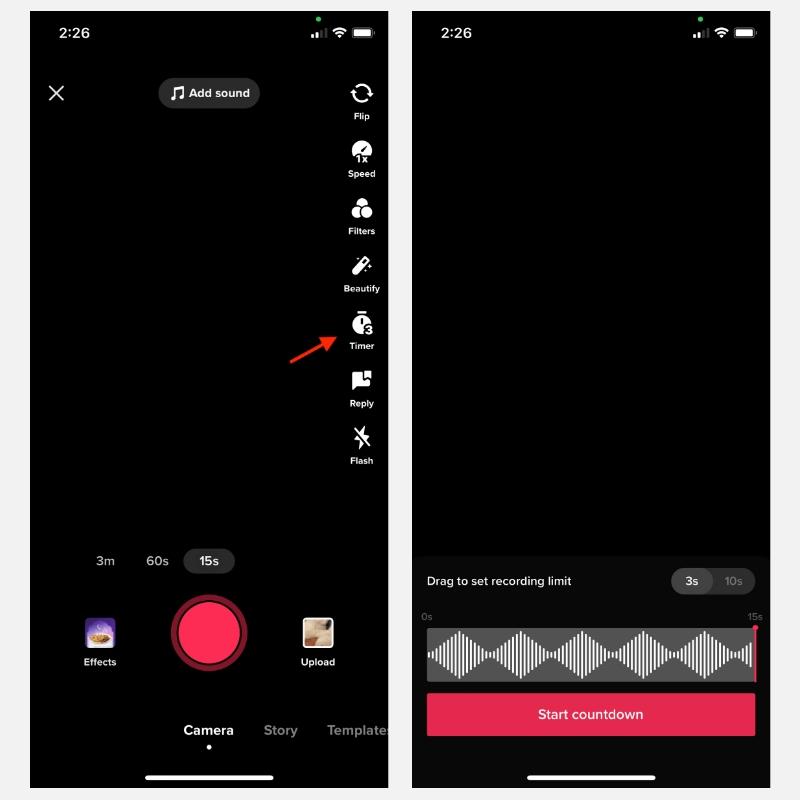
One of the standout features of TikTok is its user-friendly editing tools that empower creators to bring their visions to life. From cutting and trimming clips to adjusting playback speeds, these features allow for precise control over video length and pacing. The simplicity of the interface means that even beginners can achieve professional-looking results. Key tools include:
- Text Overlay: Add captions and text effects to enhance storytelling.
- Filters and Effects: Transform the mood of your video with a wide range of artistic filters.
- Sound Editing: Seamlessly integrate sound bites, music, and voiceovers to elevate your content.
- Speed Control: Experiment with slow-motion or time-lapses for dramatic flair.
In addition to these features, TikTok offers advanced functionalities that can set your videos apart in a crowded platform. For instance, the Green Screen effect allows users to create dynamic backdrops, while the Stitch and Duet functions enable collaboration with other creators. Understanding how to best utilize these tools can foster creativity and innovation in your videos. Consider the following chart for a quick breakdown of the most effective editing tools:
| Editing Tool | Description | Best Use Case |
|---|---|---|
| Text Overlay | Insert captions and stylish text into videos | Highlighting key messages |
| Green Screen | Place yourself in any setting | Creative storytelling |
| Sound Effects | Add music and sound bites | Enhancing emotions or humor |
| Speed Control | Slow down or speed up footage | Creating impactful transitions |
Exploring Effects and Transitions to Elevate Your Content
As you delve into TikTok’s editing suite, one of the most powerful tools at your disposal is the ability to enhance your videos through a variety of effects and transitions. Utilizing these features not only captivates your audience but also helps maintain their attention throughout the video. Here are some key visual elements to consider:
- Filters: Alter the mood and aesthetic of your video with vibrant or subtle color adjustments.
- Text Overlays: Incorporate engaging text to emphasize key points and guide viewers.
- Stickers and GIFs: Add playful elements to enhance relatability and fun.
- Dynamic Transitions: Use smooth transitions between clips to create a professional look and feel.
To further streamline your editing process, familiarize yourself with the various transition options available. Whether you’re aiming for a dramatic cut or a seamless blend between scenes, the right transition can make all the difference. Here’s a simple table highlighting the most commonly used transitions and their effects:
| Transition Type | Effect |
|---|---|
| Crossfade | Softens the passage between frames, ideal for emotional scenes. |
| Slide | Brings excitement and energy, great for fast-paced content. |
| Fade to Black | Creates a dramatic pause, effective for storytelling, and pacing. |
Crafting Compelling Audio for Engaging TikTok Videos
When it comes to TikTok videos, the audio component can elevate your content in ways that visuals alone cannot achieve. Music, sound effects, and voiceovers are integral to crafting a captivating viewing experience. Start by exploring the extensive TikTok audio library, where you can discover trending sounds and music that resonate with your target audience. Incorporating popular sounds can increase your video’s chances of going viral, so stay tuned to the latest trends and leverage sounds that evoke strong emotions or reactions. For an extra touch, consider layering sound effects to create a more dynamic soundscape that complements your visuals.
Another key aspect is the use of voiceovers to narrate your story or guide your audience through your content. A clear and engaging voice can significantly enhance your message and keep viewers invested. If you choose to include direct narration, ensure your tone and pacing align with the emotions of your video. Here are some essential tips for crafting your audio:
- Sync with Visuals: Align your audio cues with key moments in your video to enhance impact.
- Use High-Quality Recordings: Invest in a good microphone to ensure clarity if you’re using voiceovers.
- Experiment with Effects: Don’t hesitate to explore filters and adjustments to give your audio a professional touch.
Lastly, consider creating a simple table to visualize these audio components:
| Audio Type | Purpose | Tips |
|---|---|---|
| Background Music | Sets mood and tone | Choose trending songs |
| Sound Effects | Enhances key moments | Layer appropriately |
| Voiceovers | Guides audience | Maintain clarity and pacing |
Optimizing Video Length and Format for Maximum Impact
Creating engaging TikTok videos requires a deliberate approach to both length and format. The platform is designed for quick consumption, so capturing your audience’s attention within the first few seconds is crucial. Ideally, aim for a video length between 15 to 30 seconds. This duration allows for a concise message while still giving you enough time to hook viewers. Keep in mind that TikTok’s algorithm favors videos that keep viewers watching until the end, so every second counts. Consider testing different lengths to see which resonates most with your audience.
When it comes to format, vertical videos are optimal due to TikTok’s mobile-first design. Make sure to use high-resolution clips and experiment with various editing styles—quick cuts, dynamic transitions, or on-screen text can all enhance engagement. Additionally, it’s beneficial to incorporate trending sounds and effects from TikTok’s library to increase visibility. The right mix of length and format can create a memorable viewing experience that encourages likes and shares, thus expanding your reach.
Concluding Remarks
mastering TikTok’s editing suite opens up a world of creative possibilities for users looking to elevate their video content. By familiarizing yourself with the platform’s various features—ranging from cutting and trimming to effects and transitions—you can produce polished, eye-catching videos that resonate with your audience. Remember, practice is key; the more you experiment with TikTok’s tools, the more adept you’ll become at navigating its unique editing landscape. Don’t be afraid to tap into your creativity and explore different styles and techniques. With time and dedication, you’ll not only create flawless videos but also carve out your niche within the vibrant TikTok community. So, grab your smartphone, start editing, and get ready to showcase your talent to the world!