
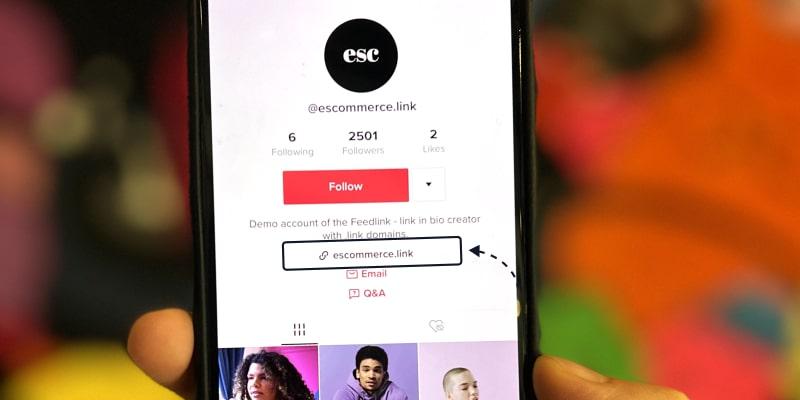
In the fast-paced digital landscape where social media platforms like TikTok reign supreme, users often find themselves navigating a labyrinth of content, trends, and viral challenges. While these platforms provide entertainment and a sense of community, they also pose significant risks that can compromise your online safety. One of the most concerning threats stems from the seemingly benign links that flood TikTok feeds, enticing users to click and explore further. In this article, we will delve into the common tactics used by malicious actors to exploit TikTok links and redirects, highlighting the potential dangers and offering practical advice on how to safeguard your personal information. With the right knowledge and proactive measures, you can enjoy the vibrant world of TikTok while minimizing risks and protecting your digital footprint.
Table of Contents
- Understanding the Digital Landscape: The Nature of TikTok Links and Redirects
- Identifying Potential Threats: Common Risks Associated with TikTok Links
- Proactive Measures: How to Safeguard Your Online Experience
- What to Do If You Encounter Malicious Links: A Step-by-Step Approach
- To Conclude
Understanding the Digital Landscape: The Nature of TikTok Links and Redirects
As TikTok continues to dominate the social media landscape, users are increasingly exposed to various links and redirects that can lead to both engaging content and potential risks. These links often lead to external sites, where the actual safety of the URL can be suspect. Occasionally, legitimate-looking links might disguise fraudulent websites, leading users to spam, scams, or even harmful downloads. It’s essential to approach any link shared in TikTok videos or comments with caution, particularly if it’s shortened or appears unusual. Here are some key points that illustrate the nature of these links:
- Unverified Sources: Links from unknown or unverified users should always raise a red flag.
- Clickbait Tactics: Many links exploit curiosity with sensational titles that may lead to disappointing or harmful content.
- Shortened URLs: These can mask the true destination, making it harder to identify whether the site is trustworthy.
Understanding the mechanics of redirects is crucial for TikTok users. When clicked, users may be taken through several layers of redirects before reaching the final destination, which can sometimes lead to dangerous sites. This process can obscure the original link’s authenticity, allowing malicious actors to embed harmful content. Here’s a simplified comparison illustrating common redirect scenarios:
| Redirect Scenario | User Experience | Potential Risk |
|---|---|---|
| Direct Link | User lands on the expected site. | Low |
| Single Redirect | User is momentarily redirected. | Moderate |
| Multiple Redirects | User experiences delays and confusion. | High |
Identifying Potential Threats: Common Risks Associated with TikTok Links
When navigating the vibrant world of TikTok, it’s essential to be aware of the potential risks that can accompany seemingly innocent links. Users often encounter links that promise hilarious videos or exclusive content but may lead to malicious sites designed to compromise your personal information. These redirections can expose users to a myriad of threats, including:
- Phishing Attacks: Cybercriminals may use TikTok links to create fake login pages, tricking users into entering their credentials.
- Malware Installation: Clicking on a deceptive link could trigger downloads of harmful software that can infect your device.
- Data Theft: Some links may direct users to sites that harvest personal data, leading to identity theft.
Moreover, understanding the structure of URLs shared on TikTok can provide additional insight into potential hazards. Many malicious links are disguised using URL shorteners, making it challenging to identify their true destination. To help users recognize the common forms these links may take, the following table outlines some red flags:
| Indicator | What to Look For |
|---|---|
| Lengthy URLs | Links that appear unusually long or complex can be suspect. |
| Unfamiliar Domains | Links that lead to domains you haven’t heard of should raise concern. |
| Extra Characters | URLs with numerous symbols or added parameters could be deceptive. |
Proactive Measures: How to Safeguard Your Online Experience
To enhance your online safety and prevent falling victim to malicious links, consider implementing the following strategies:
- Enable Two-Factor Authentication: Adding an extra layer of security to your accounts can significantly reduce the risks associated with unauthorized access.
- Verify Links Before Clicking: Always hover over links to see the actual URL before clicking. Avoid clicking on suspicious or shortened links from unknown sources.
- Regularly Update Software: Ensure that your operating systems, browsers, and apps are up-to-date to protect against newly discovered vulnerabilities.
- Use VPNs: Virtual Private Networks can help secure your internet connection, making it harder for hackers to track your activity.
In addition to these precautions, educating yourself about potential red flags can further enhance your security. Consider using a table format to identify common signs of fraudulent links:
| Red Flag | What It Means |
|---|---|
| Unusual URL Structure | Links that contain strange characters or misspellings may be attempts to mislead you. |
| Urgent or Threatening Language | Messages claiming immediate action is required are often scams designed to create panic. |
| Lack of HTTPS | Websites without secure connections (https://) are less trustworthy. |
What to Do If You Encounter Malicious Links: A Step-by-Step Approach
Encountering a malicious link can be alarming, but swift action can minimize potential harm. First, do not click on the link. Instead, take a moment to assess the situation. You can check the URL by hovering over it to see where it leads without actually clicking. If it appears suspicious or unfamiliar, proceed cautiously. Always make sure your device has up-to-date antivirus software, as this can provide an additional layer of protection against harmful content. If you suspect the link was shared through a social media platform or messaging app, consider reporting the account or post to help protect others from potential threats.
If you’ve clicked on a suspicious link, your next steps are crucial. Disconnect from the internet immediately to prevent data theft or further malicious actions. Then, run a full virus scan with your antivirus software to identify and eliminate any potential threats. Review your personal accounts — particularly email and banking — for unusual activity, and update your passwords if necessary. You should also consider informing your contacts that they may have been targeted, as this will give them a chance to avoid similar traps. educate yourself about future online safety measures, such as using link preview tools or choosing secure platforms to browse.
To Conclude
while TikTok offers an engaging platform for creativity and connection, it is essential to remain vigilant about the risks associated with links and redirects. By being informed and cautious, you can protect your personal information and enjoy a safer online experience. Always verify the credibility of links, utilize privacy settings, and consider employing security tools to enhance your online safety. As we continue to navigate the digital landscape, staying educated about potential threats is the first step toward safeguarding ourselves and our data. Remember, a little vigilance goes a long way in ensuring your online experience remains enjoyable and secure. Stay safe, and happy TikToking!