
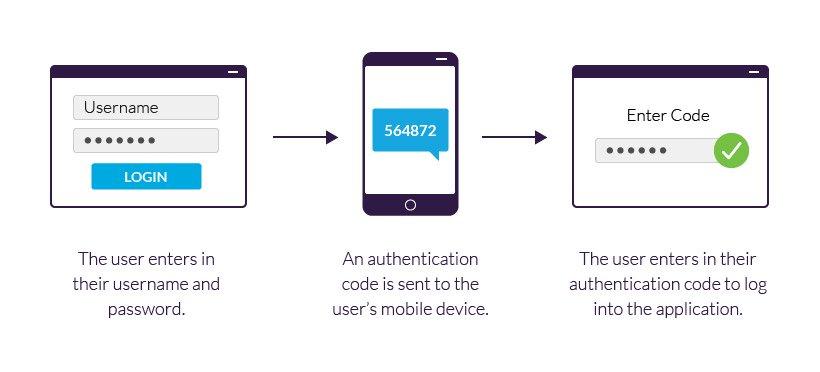
In today’s digital landscape, securing our online accounts has never been more crucial. With the increasing prevalence of cyber threats, social media platforms like TikTok have ramped up their security measures to protect users’ personal information and content. One of the most effective ways to bolster your account’s security is by enabling Two-Factor Authentication (2FA). This extra layer of protection ensures that even if someone obtains your password, they won’t be able to access your account without an additional verification step. In this comprehensive step-by-step guide, we will walk you through the process of enabling Two-Factor Authentication on TikTok, helping you to safeguard your account and enjoy peace of mind while sharing your creativity with the world. Whether you’re a seasoned TikTok creator or a new user just getting started, this guide will equip you with the knowledge you need to enhance your account’s security effectively. Let’s dive in!
Table of Contents
- Understanding the Importance of Two-Factor Authentication on TikTok
- A Comprehensive Walkthrough to Activate Two-Factor Authentication
- Choosing the Right Authentication Method for Enhanced Security
- Troubleshooting Common Issues with TikToks Two-Factor Authentication
- To Wrap It Up
Understanding the Importance of Two-Factor Authentication on TikTok
In today’s digital age, the security of our online accounts has never been more critical. TikTok, being one of the most popular social media platforms, has garnered millions of users globally, making it a prime target for hackers and cybercriminals. By enabling two-factor authentication (2FA), TikTok users can significantly enhance their account’s security, adding an extra layer that requires more than just a password for access. This extra requirement acts as a safeguard against unauthorized access, ensuring your personal information and creative content stay protected from prying eyes.
Moreover, the benefits of two-factor authentication extend beyond mere account protection. It helps build trust with your followers, showcasing a commitment to security and privacy. Here are some key reasons why enabling 2FA is essential:
- Increased Security: Even if your password is compromised, the additional verification step makes it much harder for intruders to gain access.
- Protection Against Phishing: 2FA acts as a barrier, reducing the risk of falling victim to phishing attacks.
- Peace of Mind: Knowing that your account has an extra layer of security allows you to use TikTok without the fear of losing your account.
A Comprehensive Walkthrough to Activate Two-Factor Authentication
To initiate the process of enabling Two-Factor Authentication (2FA) on your TikTok account, first, open the TikTok app and log in if you haven’t already. Once logged in, navigate to your profile by tapping on the “Profile” icon located at the bottom right of your screen. Next, select the three horizontal lines in the top right corner to access the settings menu. From there, tap on “Privacy” and then “Security”. You will find the option for ”Two-Factor Authentication”. Here, you can start the setup process.
The following methods are available for enabling 2FA on your account:
- Text Message (SMS): Receive confirmation codes via SMS to your registered phone number.
- Authentication App: Use a third-party app, such as Google Authenticator, to generate time-sensitive codes.
- Backup Codes: Generate a set of backup codes to use in case you don’t have access to your primary 2FA method.
Once you select your preferred method, follow the on-screen instructions to complete the setup. Make sure to store your backup codes in a safe place for future access. Activating this feature will significantly enhance the security of your TikTok account by adding a vital extra layer of protection.
Choosing the Right Authentication Method for Enhanced Security
When it comes to establishing robust security measures for your TikTok account, selecting an appropriate authentication method is crucial. Two-factor authentication (2FA) stands out as one of the most effective measures to thwart unauthorized access. By implementing 2FA, users augment their account’s protection layer by requiring not only a password and username but also a second factor, typically a verification code sent to their mobile device. This added requirement significantly reduces the risk of identity theft, as potential hackers would need access to both the password and the second element to breach the account.
It’s essential to evaluate the options available for 2FA when securing your TikTok account. Below are several common methods you can consider:
- SMS Codes: A code sent directly to your phone number.
- Authenticator Apps: Use apps like Google Authenticator or Authy for generating time-based codes.
- Email Verification: A unique link or code sent to your registered email.
Each method has its own strengths and weaknesses. For instance, while SMS codes are easy to use, they can be vulnerable to interception. On the other hand, authenticator apps provide increased security by generating codes locally on your device. Regardless of the method you choose, enabling two-factor authentication is a proactive step towards preserving the integrity and security of your online presence.
Troubleshooting Common Issues with TikToks Two-Factor Authentication
While enabling two-factor authentication (2FA) on TikTok enhances your account’s security, users may encounter certain issues during the process. If you find yourself unable to activate 2FA, here are a few common problems and their potential fixes:
- Verification Code Not Received: Ensure that your phone number is entered correctly. If you still don’t receive the code, try waiting a few minutes or requesting another code.
- Expired Verification Codes: Keep in mind that codes typically expire after a short period. Make sure to enter the code promptly after receiving it.
- App Not Supporting 2FA: Some outdated versions of the TikTok app may not support this feature. Always update to the latest version from your app store.
If you continue to experience difficulties, checking your internet connection is essential, as poor connectivity can prevent the app from sending verification codes. Additionally, clearing the app’s cache or reinstalling TikTok may resolve persistent issues. For more complex problems, you might need to reach out to TikTok’s customer support for assistance. Here’s a quick table summarizing troubleshooting steps:
| Issue | Solution |
|---|---|
| Code Not Received | Check phone number and request a new code. |
| Expired Code | Request a new code immediately. |
| App Compatibility | Update the app to the latest version. |
| Connectivity Issues | Verify your internet connection. |
To Wrap It Up
securing your TikTok account with two-factor authentication is a crucial step in protecting your personal information and enhancing your online safety. By following the steps outlined in this guide, you can easily enable this feature and enjoy peace of mind knowing that your account is better safeguarded against unauthorized access. Remember that digital security is an ongoing effort; keeping your software updated and being vigilant about phishing attempts are just as important. As you navigate the vibrant world of TikTok, take pride in empowering your digital presence with robust security measures. Stay safe, stay creative, and keep sharing the content you love! If you have any questions or need further assistance, don’t hesitate to drop a comment below. Happy TikToking!