
In the ever-evolving world of social media, TikTok has emerged as a powerful platform for creativity, self-expression, and connection. With millions of users worldwide sharing their unique talents and stories, the app has cultivated a vibrant community. However, like any popular online space, TikTok is not immune to challenges such as harassment, inappropriate content, and negative interactions. Understanding how to navigate these issues is crucial for maintaining a positive experience on the platform. In this essential guide, we will delve into the vital processes of blocking and reporting users on TikTok. Whether you are dealing with unwanted attention or simply want to create a safer environment for yourself and your followers, this comprehensive resource will equip you with the knowledge and tools necessary to effectively manage your TikTok experience. Join us as we explore the steps to take when faced with disruptive behavior and empower you to take control of your online interactions.
Table of Contents
- Understanding the Need for User Blocking and Reporting on TikTok
- Step-by-Step Guide to Blocking Unwanted Users
- How to Report Inappropriate Content Effectively
- Best Practices for Maintaining a Safe and Enjoyable TikTok Experience
- To Wrap It Up
Understanding the Need for User Blocking and Reporting on TikTok
In today’s digital landscape, where social media platforms connect millions of users globally, the necessity for effective measures against harassment and inappropriate behavior has never been more critical. TikTok, a vibrant ecosystem for creativity and self-expression, sometimes becomes a platform for negative interactions that can detract from users’ experiences. Implementing user blocking and reporting features is vital as they empower individuals to take control of their online interactions, ensuring a safer environment. By utilizing these tools, users can protect themselves from toxic behavior, unwanted comments, and potential threats, ultimately promoting a healthier community where creativity can flourish.
The decision to block or report a user is not merely a reaction to an isolated incident; it’s a crucial component of maintaining personal safety and mental well-being. Users are encouraged to recognize the signs of harassment, such as persistent unwanted messages or derogatory comments. Here are some reasons why blocking and reporting are essential:
- Safe Space Creation: Blocking unwanted users creates a refuge where one can express creativity without fear.
- Encouraging Positive Engagement: Reporting harmful behavior discourages negativity and promotes a more positive TikTok experience.
- Community Responsibility: Every user plays a role in fostering a respectful community by taking action against misconduct.
In using these features, you not only safeguard your own experience but also contribute to a larger movement of accountability within the TikTok community.
Step-by-Step Guide to Blocking Unwanted Users
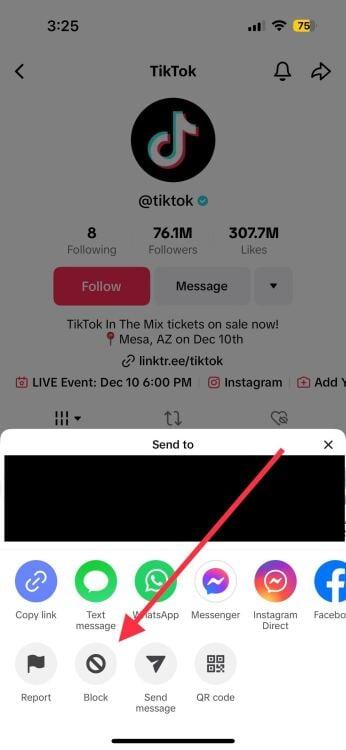
Blocking unwanted users on TikTok is a straightforward process that can provide you with a safer and more enjoyable social media experience. To begin, navigate to the profile of the user you wish to block. Once there, tap the three-dot icon in the upper right corner of the screen. This will open a menu where you can find the Block option. Simply tap on it, and a confirmation message will appear. Confirm your choice, and the user will be blocked immediately, preventing them from viewing your content or interacting with you.
If you’re looking to manage your blocked users more effectively, you can also access your settings for a comprehensive overview. Head to your profile, click on the three-line icon in the top right, and select Settings and Privacy. Scroll down to the Privacy section, where you will find Blocked Accounts. Here, you can review the list of individuals you’ve blocked and can choose to unblock any user if you change your mind later. Keeping control over your interactions can ensure that your TikTok experience remains positive and aligned with your preferences.
How to Report Inappropriate Content Effectively
When you encounter inappropriate content on TikTok, it’s essential to ensure a safe and enjoyable experience for all users. To report a violation effectively, start by tapping the Share icon on the offending video, then select Report. Here are some key steps to consider:
- Select the reason: Choose the most appropriate option from the menu, such as harassment, dangerous behavior, or nudity.
- Provide additional context: If possible, add specifics in the comments section to give the moderation team clearer insight into the issue.
- Follow up: After reporting, keep your eyes peeled for any updates or actions taken by TikTok.
It’s also prudent to familiarize yourself with TikTok’s community guidelines, which outline what is deemed inappropriate. Understanding these rules can enhance the reporting process, helping ensure that your complaint is valid and clear. Consider using the following table to categorize common types of inappropriate content:
| Type of Content | Reporting Method |
|---|---|
| Harassment or Bullying | Report directly via video. |
| Hate Speech | Select option in report menu. |
| Sexual Content | Use report feature & block user. |
| Dangerous Acts | Immediate report for safety. |
Best Practices for Maintaining a Safe and Enjoyable TikTok Experience
To create a positive and secure atmosphere on TikTok, users should adopt some best practices that ensure a safe environment while enhancing their overall experience. First and foremost, it is essential to review your privacy settings regularly. This includes controlling who can view your videos, send you messages, or comment on your posts. By adjusting your privacy settings, you can create a personalized shield against unwanted interactions. Additionally, consider limit interactions with users you don’t know—this reduces the risk of encountering inappropriate content or harmful behavior.
Furthermore, knowing how to effectively block or report users who engage in harassment or bullying is a vital aspect of maintaining a safe TikTok experience. Upon encountering harmful content or behavior, take the following steps:
- Block Users: Navigate to the user’s profile, tap the three dots in the corner, and select “Block.” This action prevents the user from interacting with you.
- Report Content: If you see a post that violates TikTok’s community guidelines, tap the arrow icon on the right side of the video, select “Report,” and follow the prompts to flag the content.
- Document Incidents: If harassment persists, consider taking screenshots of the interactions for evidence, which may be useful if you decide to report the user to TikTok’s support team.
To Wrap It Up
Conclusion
Navigating the vibrant and dynamic world of TikTok can be a thrilling experience, but it’s essential to prioritize your safety and well-being while enjoying the platform. By understanding the processes for blocking and reporting users, you empower yourself to create a more enjoyable and secure user experience. Take the time to familiarize yourself with these tools, ensuring that you’re equipped to handle any unwanted interactions seamlessly.
Remember, TikTok is all about creativity and connection. While it’s important to engage with a diverse community, you should never hesitate to protect yourself from negativity and harassment. With the information in this guide, you’re now well-prepared to curtail any disruptions and focus on what truly matters: sharing and discovering content that inspires you.
Thank you for reading, and happy TikToking! Stay safe and keep creating!