
In an age where digital security is more crucial than ever, protecting your online presence has become a top priority for users across various platforms. TikTok, the highly popular social media app that has taken the world by storm, is no exception. With millions of users sharing content and connecting globally, safeguarding your account is essential to prevent unauthorized access and potential breaches. One of the most effective ways to enhance your account’s security is by enabling Two-Factor Authentication (2FA). This step-by-step guide will walk you through the process of setting up 2FA on TikTok, ensuring that your personal information and creative content remain secure. Join us as we delve into the simple steps you can take to bolster your TikTok account’s defenses and enjoy a safer social media experience.
Table of Contents
- Understanding the Importance of Two-Factor Authentication on TikTok
- Navigating the TikTok App Settings for Security Features
- Configuring Your Two-Factor Authentication Method with Ease
- Troubleshooting Common Issues During TikTok Two-Factor Authentication Setup
- Insights and Conclusions
Understanding the Importance of Two-Factor Authentication on TikTok
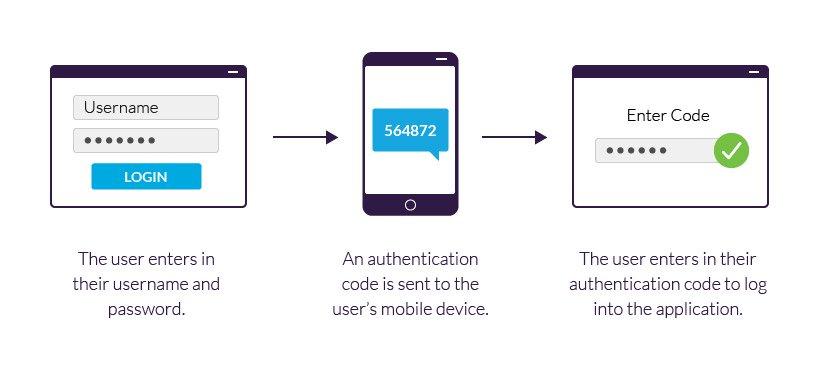
Two-factor authentication (2FA) is a critical security feature that adds an extra layer of protection to your TikTok account, safeguarding against unauthorized access. With cyber threats on the rise, employing 2FA ensures that even if someone obtains your password, they would still need a second piece of information to log in. This dramatically reduces the risks associated with hacking attempts and keeps your personal content secure. By enabling this feature, users can feel more confident that their creative expressions and private data are well-guarded.
There are several benefits to utilizing 2FA on your TikTok account, including:
- Enhanced Security: Protects your account from potential breaches.
- Real-Time Notifications: Alerts you to any suspicious login attempts.
- Control Over Access: Ensures only you can access your content and personal information.
By taking the simple steps to activate this feature, TikTok users can enjoy a more secure experience while sharing their creativity with the world. Following these recommendations can lead to a safer, worry-free environment for both casual users and influencers alike.
Navigating the TikTok App Settings for Security Features
Enabling two-factor authentication (2FA) on TikTok enhances your account’s security significantly. To get started, open the TikTok app and navigate to your Profile by tapping on the “Me” icon at the bottom right corner. From there, access the Settings and Privacy menu by tapping on the three horizontal dots (or lines) in the top right corner. Scroll down to find the Security section. Here, you’ll see an option for Two-Factor Authentication. Open it to start the setup process.
Once you’ve entered the 2FA menu, you’ll be presented with options for choosing your preferred method of authentication. You can opt for either Text Message (SMS) or an Authentication App. Selecting SMS will require you to enter your phone number, which TikTok will use to send you a one-time password (OTP) each time you log in from an unrecognized device. If you choose the Authentication App, you’ll need to scan a QR code with an app like Google Authenticator. Here’s a brief comparison table to illustrate these options:
| Method | Pros | Cons |
|---|---|---|
| Text Message (SMS) | Easy setup Quick access |
Dependent on phone Vulnerable if phone is lost |
| Authentication App | More secure Works offline |
Initial setup required Requires app download |
Configuring Your Two-Factor Authentication Method with Ease
To begin the process of enabling Two-Factor Authentication (2FA) on your TikTok account, first, launch the app and navigate to your profile by tapping the “Me” icon. Once you are on your profile page, locate the three dots in the top right corner to access the Settings and Privacy menu. Within this menu, look for the Security section and tap on it to reveal additional options related to account security. Here, you will find the Two-Factor Authentication setting. Simply toggle it on to start the setup process.
After enabling the feature, you will be prompted to choose your preferred authentication method. TikTok usually offers two options: authentication apps and SMS codes. Using an authentication app provides a higher level of security, as it generates a unique code every 30 seconds, while SMS codes are sent directly to your registered phone number. You can easily switch between methods at any time, ensuring your account remains secure according to your preferences. To finalize the setup, enter the code sent to your chosen method, and remember to save your backup codes in a safe place to regain access if you lose your device.
Troubleshooting Common Issues During TikTok Two-Factor Authentication Setup
Setting up two-factor authentication on TikTok can sometimes lead to unexpected challenges. If you find yourself facing issues during the setup process, the following solutions may help you navigate and resolve them effectively. First and foremost, ensure that you have a stable internet connection, as a slow or unstable connection can prevent verification codes from being sent or received. Additionally, it’s essential to check your phone settings to confirm that notifications are enabled, so you don’t miss any crucial alerts. If you’re using an authenticator app, double-check that you’re scanning the correct QR code.
Another common hiccup users encounter is not receiving the verification code via SMS or email. In this case, review the following tips to troubleshoot the issue:
- Confirm your phone number and email address: Make sure they are correct and linked to your TikTok account.
- Resend the code: Look for a “Resend Code” option, as multiple requests can sometimes yield results.
- Check your spam or junk folder: Emails may end up there instead of your inbox.
- Contact customer support: If problems persist, reach out for assistance directly from TikTok’s help center.
Insights and Conclusions
enabling two-factor authentication (2FA) on TikTok is a crucial step in enhancing your account’s security and protecting your personal information from potential threats. As our online interactions grow, so does the need for robust security measures. By following the steps outlined in this guide, you can easily set up 2FA and add an extra layer of protection to your TikTok profile.
Remember, security is an ongoing process, and staying vigilant is essential. Regularly update your password, be cautious of suspicious links, and keep your app up to date to ensure you’re benefiting from the latest security features. Engaging with your followers is important, but so is keeping your content and personal information safe.
Thank you for taking the time to enhance your security on TikTok. We hope this guide has helped you navigate the process with ease. Stay safe, have fun creating, and enjoy the vibrant community that TikTok has to offer!